4. Link Plugin
djangocms-cascade ships with its own link plugin. This is because other plugins from the Cascade eco-system, such as the BootstrapButtonPlugin, the BootstrapImagePlugin or the BootstrapPicturePlugin also require a functionality in order to set links to internal- and external URLs. Since we do not want to duplicate the linking functionality for each of those plugins, it has been moved into its own mixin-classes. Therefore we will use the terminology TextLinkPlugin when referring to text-based links.
The de-facto plugin for links, djangocms-link can’t be used as a base class for these plugins,
hence an alternative implementation has been created within the Cascade framework. The link related
data is stored in a various fields in our main JSON field (named glossary).
4.1. Prerequisites
Before using this plugin, assure that 'cmsplugin_cascade.link' is member of the list or
tuple CMSPLUGIN_CASCADE_PLUGINS in the project’s settings.py.
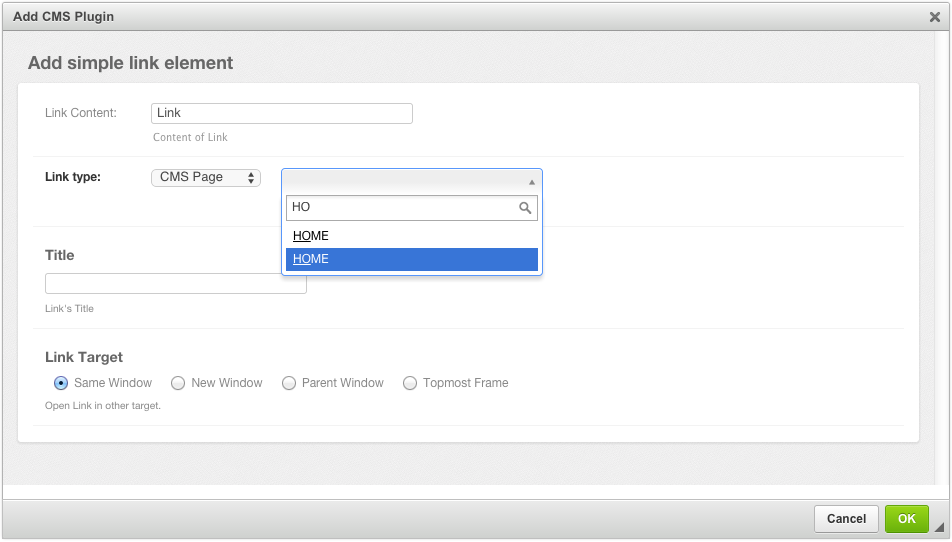
The behavior of this Plugin is what you expect from a Link editor. The field Link Content is the
text displayed between the opening and closing <a> tag. If used in combination with
djangocms-text-ckeditor the field automatically is filled out.
By changing the Link type, the user can choose between different types of Links:
- Internal Links pointing to another page inside the CMS.
- External Links pointing to a valid Internet URL.
- Files from django-filer to download.
- Links pointing to a valid e-mail address.
- Optionally any other linkable object, if another Django application extends the Link-Plugin (see below for details).
The optional field Title can be used to add a title="some value" attribute to the
<a ...> element.
With Link Target, the user can specify, whether the linked content shall open in the current window or if the browser shall open a new window.
4.2. Link Plugin with Sharable Fields
If your web-site contains many links pointing onto a few external URLs, you might want to refer to them by a symbolic name, rather than having to reenter the URL repeatedly. With djangocms-cascade this can be achieved easily by declaring some of the plugin’s fields as sharable.
Assure that INSTALLED_APPS contains 'cmsplugin_cascade.sharable', then redefine the
TextLinkPlugin to have sharable fields in settings.py:
CMSPLUGIN_CASCADE = {
    ...
    'plugins_with_sharables':
        …
        'TextLinkPlugin': ['link_type', 'ext_url'],
        …
    },
    ...
}
This will change the Link Plugin’s editor slightly. Note the extra field added to the bottom of the form.
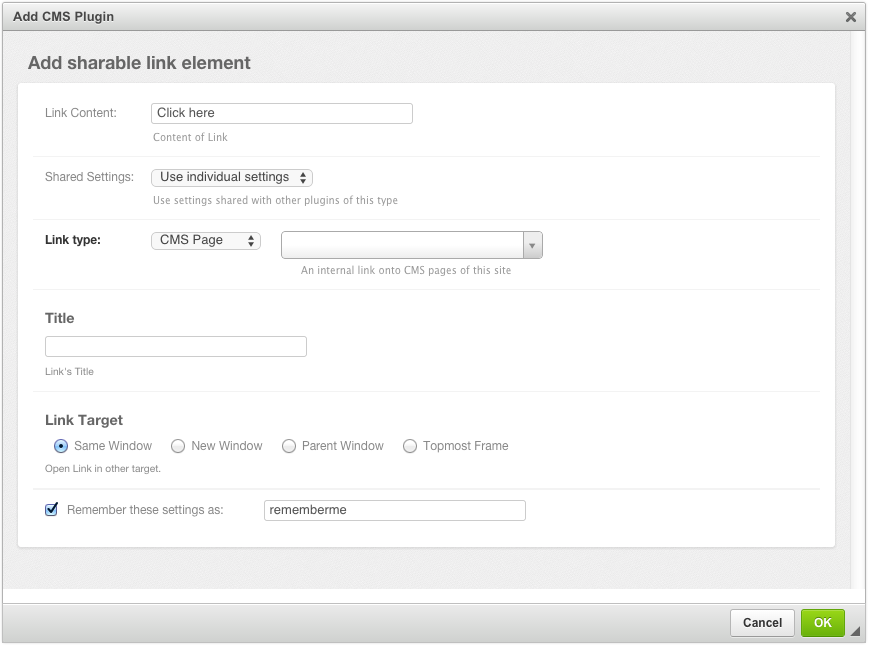
The URL for this link entity now is stored in a central entity. This feature is useful, if for instance the URL of an external web page may change in the future. Then the administrator can change that link in the administration area once, rather than having to go through all the pages and check if that link was used.
To retain the Link settings, click onto the checkbox Remember these settings as: … and give it a name of your choice. The next time your create a Shared Link element, you may select a previously named settings from the select field Shared Settings. Since these settings can be shared among other plugins, these input fields are disabled and can’t be changed anymore.
4.3. Extending the Link Plugin
While programming third party modules for Django, one might have to access a model instance through a URL and thus add the method get_absolute_url to that Django model. Since such a URL is neither a CMS page, nor a URL to an external web page, it would be convenient to access that model using a special Link type.
For example, in django-shop we can allow to link directly to a product, sold by the shop. This is achieved by reconfiguring the Link Plugin inside Cascade with:
CMSPLUGIN_CASCADE = {
    …
    'link_plugin_classes': (
        'shop.cascade.plugin_base.CatalogLinkPluginBase',
        'shop.cascade.plugin_base.CatalogLinkForm',
    ),
    …
}
The tuple specified through link_plugin_classes replaces the base class for the LinkPlugin
class and the form class used by its editor.
Here we replace the two built-in classes cmsplugin_cascade.link.plugin_base.DefaultLinkPluginBase
and cmsplugin_cascade.link.forms.LinkForm by alternative implementations.
from entangled.forms import get_related_object
from cmsplugin_cascade.link.plugin_base import LinkPluginBase

class CatalogLinkPluginBase(LinkPluginBase):
    @classmethod
    def get_link(cls, obj):
        link_type = obj.glossary.get('link_type')
        if link_type == 'product':
            relobj = get_related_object(obj.glossary, 'product')
            if relobj:
                return relobj.get_absolute_url()
        else:
            return super().get_link(obj) or link_type
This class handles links of type “Product” and creates a URL pointing onto a Django model implementing
the method get_absolute_url.
Additionally, we have to override the form class used by the Link plugin editor:
from cms.plugin_pool import plugin_pool
from django.forms import models
from shop.models.product import ProductModel

class CatalogLinkForm(LinkForm):
    LINK_TYPE_CHOICES = [
        ('cmspage', _("CMS Page")),
        ('product', _("Product")),
        ('download', _("Download File")),
        ('exturl', _("External URL")),
        ('email', _("Mail To")),
    ]

    product = models.ModelChoiceField(
        label=_("Product"),
        queryset=ProductModel.objects.all(),
        required=False,
        help_text=_("An internal link onto a product from the catalog"),
    )

    class Meta:
        entangled_fields = {'glossary': ['product']}
Now the select box for Link type will offer one additional option named “Product”. When this is selected, the page administrator can select one product in the shop and the link will point onto its proper detail page.
4.4. Using Links in your own Plugins
Many HTML components allow to link onto other resources, for instance images, the button element, icons, etc. Since we don’t want the reimplement the linking functionality for each of them, djangocms-cascade offers a few base classes, which can be used by those plugin. As an example, let’s implement a simple button plugin.
from django.forms import models
from cms.plugin_pool import plugin_pool
from cmsplugin_cascade.link.config import LinkPluginBase, LinkFormMixin
from cmsplugin_cascade.link.plugin_base import LinkElementMixin

class ButtonForm(LinkFormMixin):
    require_link = False

    button_content = models.CharField(
        label=_("Button Content"),
    )

    class Meta:
        entangled_fields = {'glossary': ['link_content']}

class ButtonPlugin(LinkPluginBase):
    name = _("Button")
    model_mixins = (LinkElementMixin,)
    form = ButtonForm
    render_template = 'myproject/button.html'
    allow_children = False

plugin_pool.register_plugin(ButtonPlugin)
What we see here is, that our ButtonForm, which is used by our ButtonPlugin inherits from
a base form offering all the fields required to link somewhere. Sine the button may just display
some content, but without linking anywhere, we make that optional by setting require_link to
False. The box for selecting the “Link Type” then adds “No Link” to its set of options.
We don’t even have to bother, whether our custom button can point onto links types specified by yet
another third party app, and not handled by djangocms-cascade – All these additional link types
are handled automatically by the configuration setting CMSPLUGIN_CASCADE['link_plugin_classes']
as explained in the previous section.